Showing posts with label educational games. Show all posts

Tuesday, February 7, 2012

Riddles for the English classroom


I've just found these old riddles on my hard drive and thought I'd share them.

Click here for the PowerPoint show http://chrisspeck.files.wordpress.com/2012/02/riddles-for-the-english-classroom.ppt

They'll provide a quick bit of speaking practice for pre-intermediate to intermediate EFL, ESOL or ESL students and you'll need to have an Interactive whiteboard or a projector to show the PPT show.

Put your students into pairs and ask them to discuss the riddles one by one before you reveal the answers. You might also find that students have their own riddles they would like to share with you and the rest of the class.

I can't remember where I found all of these, but three of them (numbers 3,7 and 8) come from the amazing and seminal English teaching book 'Challenge to Think' by Christine Frank, Mario Rinvolucri and Marge Berer' first published in 1982.

Here's the ppt file again http://chrisspeck.files.wordpress.com/2012/02/riddles-for-the-english-classroom.ppt

for more of the same visit

www.englishlanguagespacestation.com

Sunday, February 5, 2012

Quarrel - A first rate educational game that almost never got made.


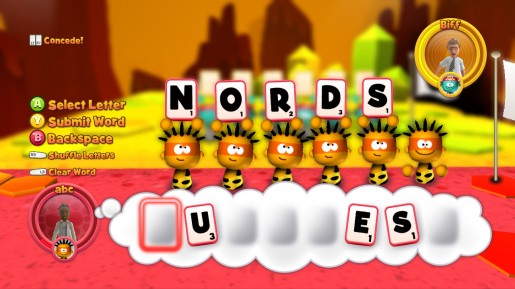
My small family uploaded 'Quarrel' from Xbox live a few days ago because it was free. It's a mixture of the old board game 'Risk' and 'Scrabble', players have to make better words than their opponents to take over their part of the map. The person who controls the whole map wins.

As a teacher and someone who is professionally interested in education and particularly e-learning, I was loathe to spend Friday night making words with my kids. I would have preferred some real action, involving zombies or motorbikes, but Quarrel won us all over pretty quickly. To my amazement I found myself buying Quarrel for 400 Xbox live points (about £3.25) and we've been playing all weekend.

It's hard to believe then, that Quarrel was nearly never released. Developed by Denki it was rejected time after time by leading games publishers because they did not think a word game would be interesting enough to make money. (see the full article here http://uk.xboxlive.ign.com/articles/121/1217197p1.html) Games publisher didn't think like me, did they? Did they think that games that aren't full of action won't make money?

Actually, Quarrel is full of action, but it's based around making words so you can defeat and kill enemy soldiers. The action depends on how well you can make words from a number of different letters.

My son already knew how to spell the word 'who' and when he used it in battle he was overjoyed to find out how powerful it was. There's your education, right there. You learn this so you can do this.

We need more games like Quarrel, so before they do get made, lets support this great game. If you've got an Xbox and are hooked up to Xbox live, search for it in the Arcade section and download it.

Tuesday, March 30, 2010

They are only games - aren't they? My kids and video games.


Last Friday night our slim line play station two died. The disk stopped spinning and the games stopped working. My four and a half year old son began to cry, he’d been waiting all week for Friday night when he could play his snow boarding game and even his sister, who’s just two, filled up. Although she can really control the characters, she still loves to play. The tears brought it home to me just how much they loved video games – maybe too much, a bit like me.

My son once played ‘Little Big Planet’ for the Playstation 3 in an electrical shop, we don’t have a playstation 3. The effect of manoeuvring a sack character round a screen was quite profound on him and he spent a long time drawing what he’d seen. He even collected the coins from down the back of the sofa to buy it. This is the power of the video game.

I only let my kids play on a Friday and Saturday night and I always watch and play with them, even so, is it healthy for little kids to play video games and how much time should they spend doing it? It must be bad right? Do I want my kids to pick up my mild addiction to video games? Reading the forums on Yahoo reveals mixed results, some say that little kids shouldn’t play at all because it’s bad for their development and they don’t understand the ‘real’ world, others say that it develops their hand-eye coordination and helps them to type faster. Of course there is always the knee jerk desire to say that all new inventions are bad, this was said of the printing press, trains, computers and of course video games.

Someone who’s thought a lot about this is the educational specialist and writer called Marc Prensky, his book ‘Don’t bother me mom, I’m learning’ is an attempt to understand the relationship between computer games, children and learning. He calls children who grow up in the modern world ‘digital natives’ and sees computer games not just a fun pastime for children, but a vital part of their development in preparation for the modern age. So would I be doing my son a disservice by not letting him play?

‘The illiterate of the future are not those who can’t read or write but those who cannot learn, unlearn, and re-learn,’ posted one of my techie friends on Facebook. It’s a quote from Alvin Toffler’s Book Powershift in which he discusses the changing face of information and power. I thought about my little son playing his snowboarding game and how he learned to do the jumps and speed up or slow down, I didn’t ever show him how to use a playstation paddle, or even a mouse, he just went right ahead and did it.

I’m a computer gamer also and just fit into Prensky’s digital native mould myself, I’ve been playing games most of my life from the old BBC micro to the playstations and xboxes of today and I guess they have had a profound influence on my life. I find it really easy, almost natural to learn to use technology and I’m not smart. The people around me, at work and in my family are constantly asking me ‘how do I do this?’ ‘How can I do that?’ and if I can help then I do, but I almost always find myself saying that ‘in the land of the blind, the one eyed man is king’. I really don’t know a lot about technology, I’m just not afraid of making mistakes. In computer games, you know that if you do it wrong then you can go back and have another go, you always get an extra life, but this isn’t necessarily true of the real world. In terms of health or relationships you might not get the chance to put things right if they go wrong.

Phycologists Hilarie Cash and Kim Mcdaniel are quick to warn of the dangerous of too much gaming, in ‘Video Games and your Kids – How you stay in control’ they descibe how older children can become heavily addicted and how exposure to video games might prevent children from  learning through discussion or listening.

Of course they really are only games and it’s how we use them with our children that makes them useful or dangerous. Too much of anything is bad for us and that’s probably the case with video games. Being ‘digital natives’ doesn’t stop kids from being kids, they need to play football, run about, read books, draw monsters as well as playing on video games.

Will I be replacing our video game console this Christmas? Of course, I miss it more than they do.

Further reading

Marc Prensky – Don’t bother me mom, I’m learning.

Hilarie Cash and Kim McDaniel – Video Games and Your Kids

Alvin Toffler - Powershift

Thursday, February 18, 2010

Blocks with Letters - Simple Flash game for IELTS / ESOL / ESL

Here's a great game written by Martin Sears that really gets your brain working.

It's a simple game that hinges on moving blocks around the screen and making sure that words are spelled correctly.  I'm not sure I'd use this game with a class , but I might set it for homework and ask students how the got on in the next session. Although the words are quite simple to start with, they get tougher so I'd suggest using this with at least a pre-intermediate / Entry 3 / B1 class.

You might like to pre teach your students some of the vocab needed

Replay

Reset (very important - you can put things back to the way they were at the start if things go wrong)

Clue

Gimme a hint ( it should of course be 'give me')


Play the game by clicking here or the picture above.

Let me know how you get on.

Monday, December 28, 2009

New Year Resolutions - Simple low level ESOL / EFL lesson

The new year is the natural time to think about changing the things that you do and the habits that you have. Most gyms will be full this week and empty by the end of February. Here's a simple E2 ESOL lesson that will get students talking and thinking about the new year

Download the lesson here http://chrisspeck.files.wordpress.com/2009/12/newyear_sresolutions.doc


All these lessons and many more can be found on my website

www.englishlanguagespacestation.com

Sunday, November 1, 2009

Flash Games for ESOl / EFL / IELTS - Just a bit of fun

You can find some really good games at


www.superduperflashgames.com


Desktop Defence


Click here to play Desktop Defence. Defence games involve you building towers to defeat hordes of enemies. This one is quick, easy to learn and difficult to master. Desktop Defence is easily the best out there. Say goodbye to break time.

Fancy Pants 1 and 2


Click here to play Fancy Pants 2 This is a well animated and very simple platform game with added depth for more serious gamers. It's got a great feel to it and the humour is nice. Try Fancy Pants 1 as well...

Flash Tennis


Click here to play Flash Tennis. Simple and yet demanding, this is a quality tennis game. With after hit control on the ball and a tight serving regime needed this quickly become maddeningly addictive.

Dino Run


Click here to play Dino Run Stylish retro gaming, guide your dinosaur at top speed in front of the crashing boulder of extintion. Fast and engaging, the multi-player option lets you race other gamers from around the globe. Simple and fantastic.

Dolphin Olymipcs 2


Click here to play Dolphin Olympics 2 Swimming around as a dolphin and performing tricks to earn points seems fairly amusing, but if you get really good at this game then you can get much further. Pointless, engaging fun.

Could you use these games in your ESOL/ESL or EFL classroom. I've got a few ideas... would love to hear how you would use them.

for more great games get on down to www.superduperflashgames.com

Thursday, September 17, 2009

Using Google Maps for ESOL / ESL / IELTS


If you're ever in need of directions or need to know where the nearest pizza shop is, then you don't need to look further than Google Maps. It's a map of the entire world which can be viewed either as a traditional road map, a satellite snapshot or a hybrid of the two. There is also the new streetview which lets you zoom right into the street for a close up view of what it looks like at ground level.  Not only that but it's a great resource for ESOL / ESL/ IELTS students at whatever level.


I used this with a group of Pre- Intermediate learners (B1 / Entry 3) in a room where students had access to a computer each. There was also an Interactive Whiteboard that I used to display examples and Google Maps.

1. Ask students these questions and spark up genuine conversation with them about where they live and the area they live in. There might be some really bad (or good) areas around where you live which you could discuss as a group : 'Where do you live?' 'Where's that near? 'Is it a good area?' ' 'Do you like living there?

2.   Show google maps and the functionality on the whiteboard. Explain how students can use the search box to find streets, the zoom features, the buttons at the top to switch between satelitte and map. Ask someone to offer their street and then find it using the search box. Zoom in on where they live if they are happy with this.

3. Pass out the work sheet and have students search through google maps to find the answers - some of the answers they might need to look on the map for. My worksheet is only a suggestion, you might like to change it with places of interest in your country and area.


Street NameTownPostcodeExtra Question:
Tiger Lane.  What’s the name of the big park near here?
Gawber Road.  What’s opposite this road?
Jack Straw’s Lane  Which streets come off this?
Downing StreetLondon Who lives in this street?
Daisy StreetGlasgow  


Click here for the full worksheet

http://chrisspeck.files.wordpress.com/2009/09/maps-on-the-internet-e3.doc

4. Encourage students to help each other and discuss anything of interest they have found. Don't leave them alone to do - this might allow them chance to catch up on their email - worse, it might make them think you don't care what they're doing. Circulate round the room look at what they are doing, offering advise or help.

5. When students have finished, make sure they turn off their computer screens so they listen to you and each other, before running through the answers together.

For more on this and other lessons visit http://s132633050.websitehome.co.uk/Computer%20lessons.htm

Monday, September 7, 2009

Loving PowerPoint - Using presentation software in your ESOL / EFL classroom

Apart from having a capital letter in the middle of it, PowerPoint is easy, quick and looks great. Here are some quick ideas on how to use this presentation software with your EFL or ESOL students.

Get your students chatting with PowerPoint.


Getting students to ask each other questions and chat with each other is the cornerstone of modern language teaching. Using PowerPoint, you can easily display questions or points for students to discuss, or reveal them one by one.

Click here for some great shows from English Language Space Station

Picture shows for lower level students


Find a picture you want in  http://images.google.co.uk/. Copy and paste the image into PowerPoint and make your own slide show. If pictures aren't clear enough, use the advanced Image search to look for only large images (http://images.google.co.uk/advanced_image_search?hl=en) You can make slide shows about any vocab area, things in the kitchen, places in town, jobs, vehicles... any vocab set.

Check out these examples  Parts of a car and Things in the Kitchen and Things in a house

Get your students using PowerPoint as well


If your students have access to computers then why not let them have a go at making a show. They could research a famous person, their hometown, a capital city they like, a country etc and then give a presentation on using their own PowerPoint show. Student confidentiality prevents us showing some student example, but they are great!

This isn't new...


We know. But sometimes you can't see the wood for the trees

Other people using PowerPoint in quirky ways...


Tim Key's PowerPoint Poetry

How I fell in love with PowerPoint - David Gaffney

Great PowerPoint Lessons


http://www.englishlanguagespacestation.com/complete_PowerPoint_Lessons.htm

Friday, August 28, 2009

Flash Games for EFL/ESOL/ IELTS students #1 - Hapland - Reading Instructions

Hapland - Reading Instructions


This is a very frustrating flash game.  I used it with my Level 1+/B1+ students to help them read for meaning.


Basically the idea of the game is to get the little man to safety byclicking on different parts of the picture in the right order.


hapland.swf


 How I ran the lesson.


1. All students had a computer. I directed them to the 'Hapland' website. Click here http://homepage.ntlworld.com/rallen/hapland.swf I asked the students to play it for two minutes. Then I elicited their opinions, did they think it was a good game? Would they play it?


2. Now I handed out the instructions (below) . They had to read carefully following these to complete the game. I encouraged them to help each other.


Instructions


a)    Open all the windows and turn the red arrow around.


b)    Open the hatch on the right, click the yellow arrow to get a man out.


c)     Click on the man to fire one round in the low position to drop the bridge down.


d)    Click the cannon to move it up. Fire the second round up at the bell and click the spear thing so it goes the other way JUST after the round hits the bell


e)    Fire the next two rounds at the bridge, but click the bridge to as they hit it to knock them in the air and explode without causing damage.


f)      Click the light bulb a few times next to the man at the bottom to get him to smash it.


g)    Fire the last round in the low position, and the bottom man will pick it up and open the door with it.


h)    Now click the man by the machine so he gets in it, and click the yellow arrow to get another guy out, get him to fire the other man up at the bell.


i)      The man by the bell will move the tower over if you click him. Then click the spear thing. Now keep clicking the bell till it falls. No more land mine.


j)        Click the door in the bottom left so the man comes out and JUST as he goes in the door on the right, click the man at the bottom. A dog tries to chase him, but the falling concrete stops it.


k)      You did it!


How was it successful?


- students generated a lot of natural language when trying to help each other. 'What do I do?' 'You don't do it like that' 'How do you do that again? etc. This kind of helping language is really useful, asking for clarification or explaining is also vital in speaking English is a real context. Maybe I should have made that more the focus of this lesson.


- They really had to read the instructions to be able to complete the game. It was a good test of their comprehension skills. 


What went wrong?


- some people don't like video games and without my help and explanation might have confused this task with- 'having a bit of a laugh'.


- it was just too hard for some of the students although they were encouraged to ask for help from other students.